If you cannot modify a revision description in Subversion (SVN) because of the following error:
Repository has not been enabled to accept revision propchanges;
ask the administrator to create a pre-revprop-change hook
(or 'almost in Polish' ;)
Repozytorium nie ma włączone możliwości zmieniania atrybutów;
poproś administratora o utworzenie skryptu hook pre-revprop-change
it can be solved by creating an pre-revprop-change.bat file (in case you are using Windows) in the hooks directory of the repository. Of course the file does not have to be empty, it can do something like logging information about changes being made (because Subversion's revision properties are not versioned).
UPDATE:
On Windows 2003 BAT files cannot be empty - see here.

2007/09/30
Shorewall does not start at boot time
I am neither shell scripting nor security guru, but I think that there is an error in the /etc/init.d/shorewall script that installs with the version 3.2.6-2 of Shorewall.
I installed Shorewall using Synaptic today, configured it and tested that I can start it manually. Then I restarted the computer and found out that there are no rules defined in any iptables chain (sudo iptables -L). I used the sudo invoke-rc.d shorewall start command to check what's happening during boot time and I saw the following error:
Please read about Debian specific customization in
/usr/share/doc/shorewall/README.Debian.gz.
After a few minutes of checking by trial and error I knew there was a problem with a piece of code right after the # check if shorewall is configured or not comment and after a few more minutes I modified it and the problem was solved. Below is the modified version - the script was looking for a wrong file and checking a non-existent variable.
I installed Shorewall using Synaptic today, configured it and tested that I can start it manually. Then I restarted the computer and found out that there are no rules defined in any iptables chain (sudo iptables -L). I used the sudo invoke-rc.d shorewall start command to check what's happening during boot time and I saw the following error:
Please read about Debian specific customization in
/usr/share/doc/shorewall/README.Debian.gz.
After a few minutes of checking by trial and error I knew there was a problem with a piece of code right after the # check if shorewall is configured or not comment and after a few more minutes I modified it and the problem was solved. Below is the modified version - the script was looking for a wrong file and checking a non-existent variable.
# check if shorewall is configured or not
if [ -f "/etc/shorewall/shorewall.conf" ]
then
. /etc/shorewall/shorewall.conf
if [ "$STARTUP_ENABLED" != "Yes" ]
then
not_configured
fi
else
not_configured
fi
2007/09/28
Listing users and all roles they're members of (SQL Server 2005)
I admit it's trivial but it took me awhile today to understand what data is shown in the sys.database_role_members catalog view, so I am posting this in case I forget.
SELECT
  DP1.name as ROLE_NAME
, DP2.name as [USER_NAME]
FROM sys.database_role_members DRM
INNER JOIN sys.database_principals DP1
  ON DRM.role_principal_id = DP1.principal_id
INNER JOIN sys.database_principals DP2
  ON DRM.member_principal_id = DP2.principal_id
2007/09/05
Disabling or enabling multiple jobs with a single click
If you navigate to <SQL Server instance>\SQL Server Agent\Jobs in SQL Server Management Studio and then right-click on some job, you'll see a context menu with Enable and Disable commands.
However, when you select more than one job and then right-click on the selection, a different menu shows and, of course [sic], it does not contain these commands.
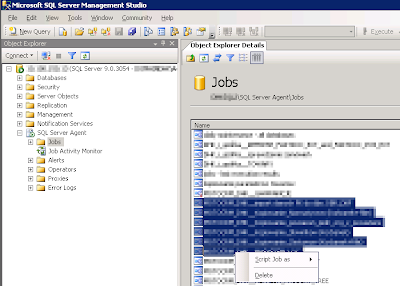
Luckily there is another way to do it - you can use Job Activity Monitor which uses the same context menu for a single job as well as multiple jobs.

However, when you select more than one job and then right-click on the selection, a different menu shows and, of course [sic], it does not contain these commands.

Luckily there is another way to do it - you can use Job Activity Monitor which uses the same context menu for a single job as well as multiple jobs.

2007/09/04
SSIS imports NULLs instead of numeric values from an Excel file
Let's imagine that you have been assigned a task to import some kind of parts catalogue from an Excel file to SQL Server table. You decided to use Integration Services. One of the columns in the Excel file contains catalogue numbers. Most of them look like this XYZ123456 but some of them are plain numeric values.
This is what can happen:
This is what can happen:
Excel          SQL Server
CAT_NO         CAT_NO
---------      ---------
XYZ121156      XYZ121156
XYZ654321      XYZ654321
ABC120456  =>  ABC120456
CBA183456      CBA183456
ZYX123416      ZYX123416
123            NULL       (!)
ZXV654521      ZXV654521
This article from SQL Server 2005 Books Online explains this weird behaviour:
Missing values
The Excel driver reads a certain number of rows (by default, 8 rows) in the specified source to guess at the data type of each column. When a column appears to contain mixed data types, especially numeric data mixed with text data, the driver decides in favor of the majority data type, and returns null values for cells that contain data of the other type. (In a tie, the numeric type wins.) Most cell formatting options in the Excel worksheet do not seem to affect this data type determination. You can modify this behavior of the Excel driver by specifying Import Mode. To specify Import Mode, add IMEX=1 to the value of Extended Properties in the connection string of the Excel connection manager in the Properties window.
2007/07/27
Preventing code from being generated in InitializeComponent() method for a property
When you place controls on a form, Visual Studio generates code in the InitializeComponent() method that sets values of their properties.
If you are developing a custom control and you don't want Visual Studio to generate such code for some of its properties, you should apply the DesignerSerializationVisiblityAttribute to such properties and place DesignerSerializationVisiblity.Hidden value on them.
If you are developing a custom control and you don't want Visual Studio to generate such code for some of its properties, you should apply the DesignerSerializationVisiblityAttribute to such properties and place DesignerSerializationVisiblity.Hidden value on them.
[DesignerSerializationVisibility(DesignerSerializationVisibility.Hidden)]
public DateTime Value
{
    get { /* ... */ }
    set { /* ... */ }
}
More information about customizing the code generated by Visual Studio can be found here.
2007/07/26
Changing file permissions (chmod) without SSH/telnet access
If you need to change file permissions (chmod) for more than just a few files and your web hosting provider gives you only FTP access to your account (neither SSH/telnet nor a good web hosting control panel system), you can use the chmod function available in PHP.
You can either write a PHP script that calls chmod for each file that needs its permissions to be changed or use this snippet to call chmod recursively and change permissions for an entire folder tree.
You can either write a PHP script that calls chmod for each file that needs its permissions to be changed or use this snippet to call chmod recursively and change permissions for an entire folder tree.
2007/06/15
Eddie Vedder speaks Polish during a concert in Poland
I just found a video and a scan of the piece of paper with Eddie's speech.

But even with such help it still isn't easy to fully understand what he says. :)
And to have it all in one place, here's the setlist of the show they gave on 2007.06.13 in Chorzów, Poland.

But even with such help it still isn't easy to fully understand what he says. :)
And to have it all in one place, here's the setlist of the show they gave on 2007.06.13 in Chorzów, Poland.
2007/05/30
KeePassX looks ugly; making it look good again
If KeePassX (or other Qt application) looks really awful on your machine, the problem is probably the GUI Style chosen for Qt applications.
For quite a long time I couldn't find a way to change it, until I read this howto. I installed the qt4-qtconfig package and used the Qt Configuration tool (run qtconfig) to change the GUI Style to Plastique. You can see the results below.
Before

After

For quite a long time I couldn't find a way to change it, until I read this howto. I installed the qt4-qtconfig package and used the Qt Configuration tool (run qtconfig) to change the GUI Style to Plastique. You can see the results below.
Before

After

2007/05/28
Neostrada ADSL + Linux + Siemens SpeedStream 4100 modem
If you have a Neostrada ADSL connection and a Siemens SpeedStream 4100 modem, it is really easy to configure it on Linux. You only have to:
- edit the /etc/network/interfaces file and configure the card connected to the modem (you need to set the IP address, the gateway, the netmask and the broadcast address - your provider should give you all this data)
- execute /etc/init.d/networking restart
Subscribe to:
Posts (Atom)