- restart the notebook,
- press F2 to enter the BIOS setup,
- go to Advanced and then IDE Configuration,
- change the SATA Operation Mode setting to Compatible (the default setting is Enhanced).
Showing posts with label bugs. Show all posts
Showing posts with label bugs. Show all posts
2010/01/02
BSoD when installing Windows XP on ASUS K61IC notebook
If a bluescreen (Blue Screen of Death) occurs during Windows XP installation and the error message contains the 0x0000007B code, try to do the following:

2008/03/27
Shrinking an outsized KeePassX/KeePass database
There is an error in KeePassX (and there was a similar bug in KeePass, too) that can cause the database file to grow at a very rapid pace (I don't know what triggers this growth). To be precise, the database size doubles every time it is saved even if a very small change is made.
My database reached 256 MB. KeePass running on Windows XP could not open it (because of an Out of memory error) while KeePassX on Ubuntu could open it but it was taking a few minutes. But the main problem anyway was the fact that I couldn't add new entries or make any changes because the file would grow again.
I tried to shrink the file by saving it as a new database or exporting and then importing it, but it didn't work. I also tried to find a solution on the Internet, but I only found an information that there was such a bug and it was fixed in Windows version. So after a few days I downloaded the KeePass sources, spent half a day (it's been a long time since I last saw a C++ code :) first trying to make them compile (I didn't have a libboost_regex-vc80-mt-sgd-1_34_1.lib library file; I installed it with BoostPro Binary Installer for Visual C++ - take a look here and here) and then trying to find a place in the code where the individual entries get loaded. :)
Finally, it turned out that the problem was caused by an attachment which was taking almost all space in the database file (it had a few KB when I attached it some time ago).
So I placed a line responsible for loading the attachment inside a try... catch... block and added a message box.
If anyone has a similar problem, let me know - I can e-mail modified sources or a compiled EXE file.
UPDATE:
A tip from an anonymous reader:
My database reached 256 MB. KeePass running on Windows XP could not open it (because of an Out of memory error) while KeePassX on Ubuntu could open it but it was taking a few minutes. But the main problem anyway was the fact that I couldn't add new entries or make any changes because the file would grow again.
I tried to shrink the file by saving it as a new database or exporting and then importing it, but it didn't work. I also tried to find a solution on the Internet, but I only found an information that there was such a bug and it was fixed in Windows version. So after a few days I downloaded the KeePass sources, spent half a day (it's been a long time since I last saw a C++ code :) first trying to make them compile (I didn't have a libboost_regex-vc80-mt-sgd-1_34_1.lib library file; I installed it with BoostPro Binary Installer for Visual C++ - take a look here and here) and then trying to find a place in the code where the individual entries get loaded. :)
Finally, it turned out that the problem was caused by an attachment which was taking almost all space in the database file (it had a few KB when I attached it some time ago).
So I placed a line responsible for loading the attachment inside a try... catch... block and added a message box.
try
{
pEntry->pszBinaryDesc = _UTF8ToString((UTF8_BYTE *)pData);
}
catch (...)
{
AfxMessageBox((CString)"There was a problem with reading pszBinaryDesc "
+ (CString)"field of " + pEntry->pszTitle + (CString)" entry.\n"
+ (CString)"This data has been LOST. However, you can now save the "
+ (CString)"database as a new file and its size should be normal again.",
MB_ICONEXCLAMATION);
}
Thanks to this if there is a broken (outsized) attachment in some entry, an exception is thrown (important: if you try to run KeePass on Linux using WINE, this exception will not be thrown) and KeePass skips loading it and informs the user that such a problem occurred. Be aware that I didn't find a way to restore a broken attachment so some data is lost, but the database can be opened and saved as a new database. The new database has a normal size.
If anyone has a similar problem, let me know - I can e-mail modified sources or a compiled EXE file.
UPDATE:
A tip from an anonymous reader:
I was able to get around the same issue and shrink my keepass database via "File" -> "Export To" -> "KeePass Database" in v1.14. Using "Save As" wouldn't do it, but exporting did the trick!
2007/03/19
Skype may prevent Outlook from closing properly
If you use Skype with the View / View Outlook Contacts option checked, Outlook does not close properly after you hit Alt+F4 or click the Close button. It disappears from the taskbar, but the OUTLOOK.EXE process continues to run and the Outlook icon stays in the system tray.
I think this is because Skype holds some kind of lock on Outlook's address book, but that's only my guess.
Here you can find some other applications that cause similar behaviour.
I think this is because Skype holds some kind of lock on Outlook's address book, but that's only my guess.
Here you can find some other applications that cause similar behaviour.
2006/10/13
SSIS Back Up Database task - yet another annoying SQL Server 2005 'feature'
If you are using the Back Up Database tasks in your SSIS packages, you should be aware that every time you click on the Databases drop-down-list-like thing and then you click OK to close it, the folder location in the Folder textbox is automatically set to the default backup location. So if you are using another location to store your backups, you have enter it every time you change or even view the list of backed up databases.

2006/10/05
SSIS package configuration files
SSIS package may ignore a configuration file (the dtsConfig file) and use variable values stored in the package (the dtsx file), if the configuration file contains one or more special Polish characters (even if there are used only in comments - <!-- the comments go here -->).
I have no idea when or why it happens, but I have a package that worked fine, then started to behave strangely and then it all came back to normal, when I removed special Polish characters from the comments in the configuration file. The bug is reproducible.
I have no idea when or why it happens, but I have a package that worked fine, then started to behave strangely and then it all came back to normal, when I removed special Polish characters from the comments in the configuration file. The bug is reproducible.
2006/09/14


2006/07/19
Visual Studio 2003 sets a breakpoint in another file
There is a bug in Visual Studio 2003 that sometimes makes setting a breakpoint in certain files impossible. When you try to set it, the breakpoint is set, but not in the file that you opened - the moment you hit F9, VS jumps to another file and sets the breakpoint there.
I struggled with this problem for quite a long time. I tried using the mouse instead hitting F9, setting the breakpoint on different lines, reopening the file, reloading the project, restarting VS, using another machine. Nothing helped.
Finally, I discovered that I could open a Breakpoints window (Crtl+Alt+B), press New button and create a new Function Breakpoint - a breakpoint of this type was created successfully.

Note that you can copy the full name of a function from the Class View window.
I struggled with this problem for quite a long time. I tried using the mouse instead hitting F9, setting the breakpoint on different lines, reopening the file, reloading the project, restarting VS, using another machine. Nothing helped.
Finally, I discovered that I could open a Breakpoints window (Crtl+Alt+B), press New button and create a new Function Breakpoint - a breakpoint of this type was created successfully.
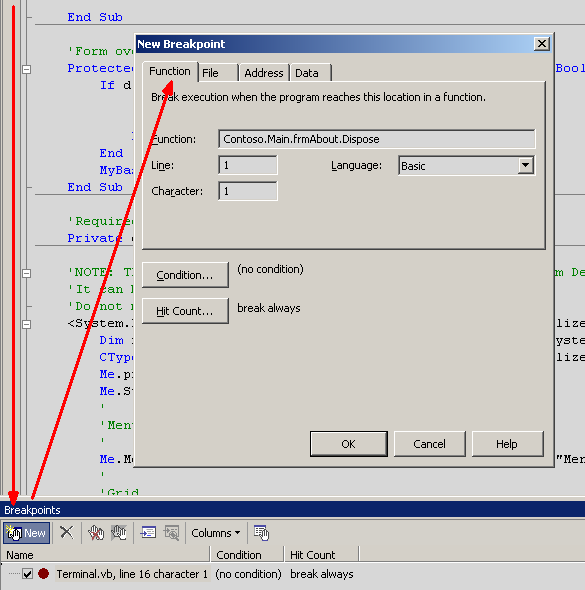
Note that you can copy the full name of a function from the Class View window.
2006/06/27
Querying a view takes ages - really weird SQL Server 2005 behaviour
There is a view called VIEW_TITLES. It is quite complicated. Executing a SELECT query against it returns 189 rows.
A query:
SELECT TOP 200 *
FROM dbo.VIEW_TITLES
takes 13 seconds to execute.
However, executing an identical, when it comes to the returned rows, query:
SELECT *
FROM dbo.VIEW_TITLES
takes an indefinite amount of time - I cancelled the execution after 5 minutes.
I have no idea how to explain this behaviour. It looks like a bug in the optimizer to me.
The only workaround I found looks like this:
SELECT TOP (SELECT COUNT(*) FROM dbo.VIEW_TITLES) *
FROM dbo.VIEW_TITLES
I know it's a pretty dirty hack, but it works. And it is still better than hard-coding some fixed number in the TOP expression.
A query:
SELECT TOP 200 *
FROM dbo.VIEW_TITLES
takes 13 seconds to execute.
However, executing an identical, when it comes to the returned rows, query:
SELECT *
FROM dbo.VIEW_TITLES
takes an indefinite amount of time - I cancelled the execution after 5 minutes.
I have no idea how to explain this behaviour. It looks like a bug in the optimizer to me.
The only workaround I found looks like this:
SELECT TOP (SELECT COUNT(*) FROM dbo.VIEW_TITLES) *
FROM dbo.VIEW_TITLES
I know it's a pretty dirty hack, but it works. And it is still better than hard-coding some fixed number in the TOP expression.
2006/03/30
Could it get any less specific?
This is a description of an error that I've read today (here):
This error is not based on any particular query construct. Also, this error is not limited to any particular database environment, to any particular amount of data, or to any particular kind of data. This error may first occur only sporadically. However, this error may occur repeatedly after the first time it occurs.
Subscribe to:
Posts (Atom)