There is a view called VIEW_TITLES. It is quite complicated. Executing a SELECT query against it returns 189 rows.
A query:
SELECT TOP 200 *
FROM dbo.VIEW_TITLES
takes 13 seconds to execute.
However, executing an identical, when it comes to the returned rows, query:
SELECT *
FROM dbo.VIEW_TITLES
takes an indefinite amount of time - I cancelled the execution after 5 minutes.
I have no idea how to explain this behaviour. It looks like a bug in the optimizer to me.
The only workaround I found looks like this:
SELECT TOP (SELECT COUNT(*) FROM dbo.VIEW_TITLES) *
FROM dbo.VIEW_TITLES
I know it's a pretty dirty hack, but it works. And it is still better than hard-coding some fixed number in the TOP expression.

2006/06/21
Debugging a Windows service
OnPause, OnContinue and OnStop methods can be debugged by simply attaching to the [WindowsServiceName].exe process and setting breakpoints in the appropriate places.
The problem gets a little bit harder when it comes to debugging OnStart method, since there is no process that can be attached to, because the service is not running. There are many ways to solve this problem, but, in my opinion, the easiest one is to
call a System.Diagnostics.Debugger.Launch() method within the OnStart method in order to start a debugger programmatically.
A detailed description of this problem can be found here.
The problem gets a little bit harder when it comes to debugging OnStart method, since there is no process that can be attached to, because the service is not running. There are many ways to solve this problem, but, in my opinion, the easiest one is to
call a System.Diagnostics.Debugger.Launch() method within the OnStart method in order to start a debugger programmatically.
A detailed description of this problem can be found here.
2006/06/08
How to format USB flash drive on Linux
You can use mkdosfs command.
For example:
sudo mkdosfs /dev/sdb1
For example:
sudo mkdosfs /dev/sdb1
2006/06/05
SSIS package execution fails when you run it from a SQL Server Agent job
I created a SQL Server Integration Services (SSIS) package. It was pretty simple and it worked fine. After testing it, I created a SQL Server job with a single step that was supposed to execute the package.
And it took me two days to make it work. Unfortunately, documentation dealing with this topic is pretty poor.
I was getting different errors - for example:
Executed as user: SOME_DOMAIN\sqlagent2005. The package could not be found.
The step failed.
Unable to start execution of step 1 (reason: Could not get proxy data for
proxy_id = 2). The step failed.
This is a method I found (I am positive that there are other ways to get the same result, too).
1. Create a credential (make sure that the chosen account can execute jobs).
2. Create an SSIS proxy using this credential.
3. Set the proxy in the 'Run as' combo in a job step definition.
4. Grant access to C:\Program Files\Microsoft SQL Server\90\DTS\Packages (or wherever you deployed your SSIS package) to the domain account that you used to create the credential.
UPDATE:
Later I found a good article about this problem - An SSIS package does not run when you call the SSIS package from a SQL Server Agent job step.
And it took me two days to make it work. Unfortunately, documentation dealing with this topic is pretty poor.
I was getting different errors - for example:
Executed as user: SOME_DOMAIN\sqlagent2005. The package could not be found.
The step failed.
Unable to start execution of step 1 (reason: Could not get proxy data for
proxy_id = 2). The step failed.
This is a method I found (I am positive that there are other ways to get the same result, too).
1. Create a credential (make sure that the chosen account can execute jobs).
2. Create an SSIS proxy using this credential.
3. Set the proxy in the 'Run as' combo in a job step definition.
4. Grant access to C:\Program Files\Microsoft SQL Server\90\DTS\Packages (or wherever you deployed your SSIS package) to the domain account that you used to create the credential.
UPDATE:
Later I found a good article about this problem - An SSIS package does not run when you call the SSIS package from a SQL Server Agent job step.
2006/05/24
sp_send_dbmail & blank messages
If you are using sp_send_dbmail stored procedure to send e-mails and the messages you receive are blank, despite the fact that you supplied @body parameter, try switching from TEXT to HTML messages (@body_format parameter).
2006/05/19
How to determine if SQL Server 2005 SP1 is installed
If Service Pack 1 has not installed, the SELECT @@VERSION query returns:
Microsoft SQL Server 2005 - 9.00.1399.06 (Intel X86)
Oct 14 2005 00:33:37
Copyright (c) 1988-2005 Microsoft Corporation
Standard Edition on Windows NT 5.1 (Build 2600: Dodatek Service Pack 2)
After installing Service Pack 1, it looks like this:
Microsoft SQL Server 2005 - 9.00.2047.00 (Intel X86)
Apr 14 2006 01:12:25
Copyright (c) 1988-2005 Microsoft Corporation
Standard Edition on Windows NT 5.1 (Build 2600: Dodatek Service Pack 2)
Microsoft SQL Server 2005 - 9.00.1399.06 (Intel X86)
Oct 14 2005 00:33:37
Copyright (c) 1988-2005 Microsoft Corporation
Standard Edition on Windows NT 5.1 (Build 2600: Dodatek Service Pack 2)
After installing Service Pack 1, it looks like this:
Microsoft SQL Server 2005 - 9.00.2047.00 (Intel X86)
Apr 14 2006 01:12:25
Copyright (c) 1988-2005 Microsoft Corporation
Standard Edition on Windows NT 5.1 (Build 2600: Dodatek Service Pack 2)
2006/04/27
How to install VMware Tools in VMware Player
After creating a 'new' virtual machine I noticed that I couldn't do a few things that I could do in the other VM (the one that served as a base when creating a 'new' one):
I installed VMware Tools and it solved all the problems.
This article explains how to install VMware Tools in VWware Player.
- I could not move the mouse between the guest system and the host system. Each time I wanted to move from one OS to another, I had to click to grab input and press Crtl+Alt to release it.
- I could not use the toolbar at the top of the VMware Player without leaving the guest system.
- I could not use the guest system in fullscreen mode.
- I could not change the size of the guest system (in a way similar to changing screen resolution) by simply resizing the VMware Player window.
I installed VMware Tools and it solved all the problems.
This article explains how to install VMware Tools in VWware Player.
2006/04/13
How to create a 'new' virtual machine using only VMware Player
Well, not exactly new, hence the quotation marks.
But if you:
And if you have more time, you may find these articles interesting:
VMX-builder
How-to: VMware player modification
How to create virtual machines using VMware Player
But if you:
- already have a virtual machine,
- need a new one with another operating system, but do not need another configuration for this new machine (for example, smaller or bigger HDD),
- make a copy of the existing virtual machine's folder,
- run the machine from the new location,
- put an installation CD of the new operating system and change the booting device to CD-ROM.
And if you have more time, you may find these articles interesting:
VMX-builder
How-to: VMware player modification
How to create virtual machines using VMware Player
2006/04/12
Visual Studio - Command Window vs. Immediate Window
While debugging in Visual Studio, I often use Command Window to check values of variables (?mySqlStr), assign values to variables (mySqlStr = "SELECT FOO_ID FROM dbo.FOO") or execute short code snippets (myDS.Fill()).
Today I closed Command Window and re-opened it after a while. And I could no longer evaluate any expressions. I also noticed a > prompt that I've never seen before.
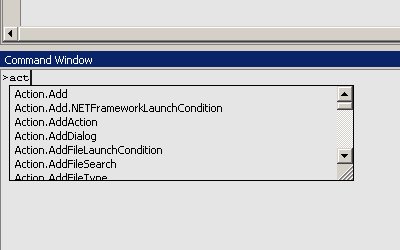
It turns out that Command Window has two different modes (clicky):

Today I closed Command Window and re-opened it after a while. And I could no longer evaluate any expressions. I also noticed a > prompt that I've never seen before.
It turns out that Command Window has two different modes (clicky):
- Command mode - used for executing Visual Studio Commands directly in the IDE, bypassing the menu system, or for executing commands that do not appear in any menu,
- Immediate mode - used for debugging purposes, evaluating expressions, executing statements, printing variable values, and so forth.

Command mode (notice the prompt)
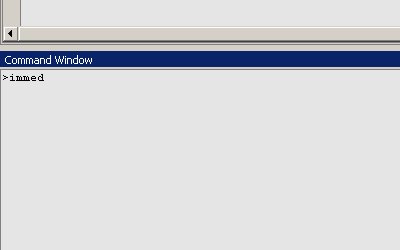
Switching from Command mode to Immediate mode (type immed and press Enter)

Switching from Command mode to Immediate mode (type immed and press Enter)
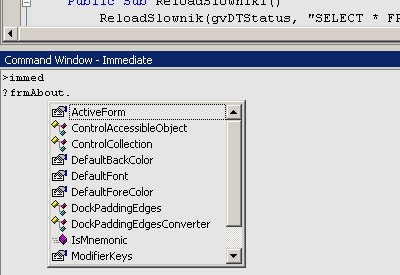
Command Window - Immediate mode (no prompt)
2006/03/30
Finding orphaned packages
If you are using Debian or any other Debian-based Linux distribution, you can use deborphan tool to find orphaned and/or unneeded packages. Read the man page for the options (--guess-all is very useful).
I have just removed over 100 packages. And my system still works. :)
I have just removed over 100 packages. And my system still works. :)
Subscribe to:
Posts (Atom)