2006/04/12

Visual Studio - Command Window vs. Immediate Window

While debugging in Visual Studio, I often use Command Window to check values of variables (?mySqlStr), assign values to variables (mySqlStr = "SELECT FOO_ID FROM dbo.FOO") or execute short code snippets (myDS.Fill()).

Today I closed Command Window and re-opened it after a while. And I could no longer evaluate any expressions. I also noticed a > prompt that I've never seen before.

It turns out that Command Window has two different modes (clicky):
  • Command mode - used for executing Visual Studio Commands directly in the IDE, bypassing the menu system, or for executing commands that do not appear in any menu,
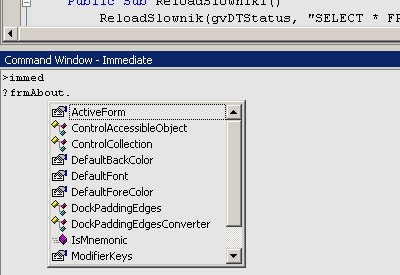
  • Immediate mode - used for debugging purposes, evaluating expressions, executing statements, printing variable values, and so forth.
Command mode (notice the prompt)
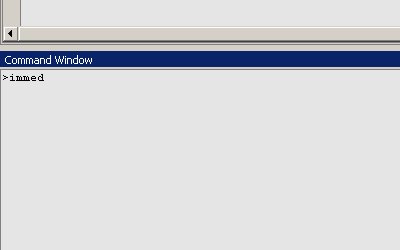

Switching from Command mode to Immediate mode (type immed and press Enter)

Command Window - Immediate mode (no prompt)

2006/03/30

Finding orphaned packages

If you are using Debian or any other Debian-based Linux distribution, you can use deborphan tool to find orphaned and/or unneeded packages. Read the man page for the options (--guess-all is very useful).

I have just removed over 100 packages. And my system still works. :)

Could it get any less specific?

This is a description of an error that I've read today (here):
This error is not based on any particular query construct. Also, this error is not limited to any particular database environment, to any particular amount of data, or to any particular kind of data. This error may first occur only sporadically. However, this error may occur repeatedly after the first time it occurs.

2006/03/29

How to list all open connections (on Linux)

lsof -i

UPDATE:

sudo lsof -i will show all open connections, not limited to current user.

2006/03/25

How to encode a DVD to an XviD file (on Linux)

There are of course many ways to do it, but a very simple one is to use:
  • Mencoder for ripping and/or encoding,
  • SimpleRip to generate all the necessary commands.

2006/03/15

The OLE DB provider 'SQLOLEDB' was unable to begin a distributed transaction

If you use SQL Server 2000 on a machine that is running Windows Server 2003 and fail to start a transaction against a linked server because of the following error:

Server: Msg 7391, Level 16, State 1, Line 2
The operation could not be performed because the OLE DB provider 'SQLOLEDB' was unable to begin a distributed transaction. OLE/DB provider returned message: New transaction cannot enlist in the specified transaction coordinator.

you should check whether Data Transaction Coordinator (MS DTC) can access the network. By default, the network access settings of MS DTC are disabled on computers that are running Windows Server 2003.

Follow these steps to enable the network access settings of MS DTC. In my opinion though, it is not necessary to reboot the computer for these changes to take effect.

2006/03/12

devenv - building a .NET solution from the command line

The easiest way to build a .NET solution (or a project) from the command line is to use devenv command.

However, there are two devenv files - devenv.com and devenv.exe. Today, I have noticed one really essential difference between them. The former one is a console tool, while the latter one is not. If you type devenv.exe to build a solution, it will start a background process and immediately return control to the console. It means that, if devenv.exe is used in a batch file, the commands succeeding it may be executed before the build process completes.

UPDATE:

The above happens only when you type something like devenv.exe SomeSolution.sln /Rebuild Release in the command line and hit Enter. It does not happen when such a command is used in a batch file.

2006/03/05

How to load subtitles in Kaffeine Player

I finally found how to manually load subtitles in Kaffeine Player.

An appropriate option is available only in the playlist context-menu.


Not very intuitive, in my opinion.

2006/03/02

There are too many geeks around, when...

... somebody asks:
And would you pass a Turing test?
and everyone starts to laugh.

2006/02/07

Maximum number of tables per SELECT statement

Have you ever wondered whether the number of tables that you can use in a single SELECT statement is limited or not?

Well, I haven't. But there is a limit. And, contrary to many maximum capacities of SQL Server 2000 specified here (like Databases per instance of SQL Server - 32,767, for example), it is possible to reach it.

When you do, you will see the following error:

Could not allocate ancillary table for view or function resolution.
The maximum number of tables in a query (256) was exceeded.

UPDATE:

I started a discussion about this problem at StackOverflow.