If you are creating a custom control and it has a property that is not shown in the Properties pane in Visual Studio IDE, ensure the property is not write-only.
Write-only properties are not shown in the Properties pane.
Read-and-write as well as read-only properties are shown in the Properties pane.

2006/11/28
Maximum column name length in SQL Server 2005
I was asked about this problem today and I could find it neither in SQL Server documentation nor online, so I checked it experimentally.
The name
'test1test1test1test1test1test1test1test1test1test1test1test1test1test1test1
test1test1test1test1test1test1test1test1test1test1test1test1test1test1test1'
is invalid because it is empty, contains invalid characters, or contains
more than 128 characters.
Maximum allowed column name length in SQL Server 2005 is 128 characters.
UPDATE:
As phorku wrote in his comment, the maximum column name length can also be determined by checking properties of the sysname data type:
The name
'test1test1test1test1test1test1test1test1test1test1test1test1test1test1test1
test1test1test1test1test1test1test1test1test1test1test1test1test1test1test1'
is invalid because it is empty, contains invalid characters, or contains
more than 128 characters.
Maximum allowed column name length in SQL Server 2005 is 128 characters.
UPDATE:
As phorku wrote in his comment, the maximum column name length can also be determined by checking properties of the sysname data type:
sysname is a system-supplied user-defined data type that is functionally equivalent to nvarchar(128) and is used to reference database object names
2006/11/26
Installing Ubuntu on ASUS A6RP-AP069 notebook
There were three problems that me and my girlfriend encountered while installing Ubuntu 6.10 (Edgy Eft) on ASUS A6RP-AP069 notebook.
- Starting the installation
There was no problem to boot the laptop from the Ubuntu CD, it showed the available option, but after choosing any of them it... froze after a few seconds.
We tried 3 or 4 different version of Ubuntu and Mandriva. Every time it hung as soon as Using hpet for high-res timesource message showed. (It is worth noticing that Ubuntu 6.10 does not show such information to the user by default, while its older version do.)
We found the solution here - adding hpet=disable to the kernel parameters worked like a charm. - Connecting to the wireless network
Ubuntu correctly detected the wireless card. We entered all necessary configuration parameters (SSID, key, etc.), activated the card and... it couldn't connect to the network no matter how many time we re-checked its configuration and restarted it.
Finally, we found this post. It's really great! We followed the instructions and the WiFi network was up and running in no time. - Enabling sound
That was the hardest part. Everything looked fine - Ubuntu detected the sound card, Amarok looked like it was playing a song, but... there was no sound. We tried to play files in different formats, we checked the headphones, we found countless posts telling to uncheck some External Amplifier option in KMix, but we found no such option.
Late at night after a lot of googling I (my girlfriend went to sleep earlier) found this post. Another great post! I recompiled alsa-driver, alsa-lib and alsa-utils packages and the sound problem was gone. - Headphones
- WPA
HOWTO: Configure SQL Server 2005 to allow remote connections
I know it doesn't seem a very hard task, but it really took me quite a lot of time to configure a SQL Server 2005 instance running on Windows XP SP2 machine to allow remote connections.
This KB article describes step by step what you have to do to be able to connect remotely to a SQL Server 2005.
In my case, there were two problems:
This KB article describes step by step what you have to do to be able to connect remotely to a SQL Server 2005.
In my case, there were two problems:
- I disabled SQL Server Browser service (which has to be running if you want to use a named instance),
- I didn't know that in Windows Firewall you can create exceptions for particular applications (and not only ports).
2006/10/28
Calling an SSIS package from a SQL Server Agent job step
If possible, always use Operating system (CmdExec) SQL Server Agent job step and DTExec.exe utility to call an SSIS package from a SQL Server Agent job step. The gives you much more verbose output information than SSIS Package step and makes troubleshooting much easier.
Just compare this:
Executed as user: DOMAIN1\sqlagent2005.
Microsoft (R) SQL Server Execute Package Utility
Version 9.00.1399.06 for 64-bit
Copyright (C) Microsoft Corp 1984-2005. All rights reserved.
Started: 10:12:30 AM
Error: 2006-10-27 10:12:30.83
Code: 0xC0014060
Source: {9D739ECB-C57C-4A4D-9DFE-80183F7B7002}
Description: Failed to decrypt a package that is encrypted
with a user key. You may not be the user who encrypted this
package, or you are not using the same machine that was
used to save the package.
End Error
Could not load package "C:\Program Files\Microsoft SQL Server
\90\DTS\Packages\Package1\Package1.dtsx" because of error
0x8009000B.
Description: Failed to remove package protection with error
0x8009000B "Key not valid for use in specified state.". This
occurs in the CPackage::LoadFromXML method.
Source: {9D739ECB-C57C-4A4D-9DFE-80183F7B7002}
Started: 10:12:30 AM
Finished: 10:12:30 AM
Elapsed: 0.438 seconds.
Process Exit Code 5.
The step failed.
and this:
Executed as user: DOMAIN1\Administrator.
The package could not be loaded.
The step failed.
UPDATE:
Also, check the comment below for yet another reason that proves the point I am making here.
Just compare this:
Executed as user: DOMAIN1\sqlagent2005.
Microsoft (R) SQL Server Execute Package Utility
Version 9.00.1399.06 for 64-bit
Copyright (C) Microsoft Corp 1984-2005. All rights reserved.
Started: 10:12:30 AM
Error: 2006-10-27 10:12:30.83
Code: 0xC0014060
Source: {9D739ECB-C57C-4A4D-9DFE-80183F7B7002}
Description: Failed to decrypt a package that is encrypted
with a user key. You may not be the user who encrypted this
package, or you are not using the same machine that was
used to save the package.
End Error
Could not load package "C:\Program Files\Microsoft SQL Server
\90\DTS\Packages\Package1\Package1.dtsx" because of error
0x8009000B.
Description: Failed to remove package protection with error
0x8009000B "Key not valid for use in specified state.". This
occurs in the CPackage::LoadFromXML method.
Source: {9D739ECB-C57C-4A4D-9DFE-80183F7B7002}
Started: 10:12:30 AM
Finished: 10:12:30 AM
Elapsed: 0.438 seconds.
Process Exit Code 5.
The step failed.
and this:
Executed as user: DOMAIN1\Administrator.
The package could not be loaded.
The step failed.
UPDATE:
Also, check the comment below for yet another reason that proves the point I am making here.
2006/10/13
SSIS Back Up Database task - yet another annoying SQL Server 2005 'feature'
If you are using the Back Up Database tasks in your SSIS packages, you should be aware that every time you click on the Databases drop-down-list-like thing and then you click OK to close it, the folder location in the Folder textbox is automatically set to the default backup location. So if you are using another location to store your backups, you have enter it every time you change or even view the list of backed up databases.

2006/10/05
SSIS package configuration files
SSIS package may ignore a configuration file (the dtsConfig file) and use variable values stored in the package (the dtsx file), if the configuration file contains one or more special Polish characters (even if there are used only in comments - <!-- the comments go here -->).
I have no idea when or why it happens, but I have a package that worked fine, then started to behave strangely and then it all came back to normal, when I removed special Polish characters from the comments in the configuration file. The bug is reproducible.
I have no idea when or why it happens, but I have a package that worked fine, then started to behave strangely and then it all came back to normal, when I removed special Polish characters from the comments in the configuration file. The bug is reproducible.
2006/10/01
HOWTO: Format nicely an XML document (beautifying XML)
From time to time I have an XML file that needs to be formatted nicely. If the file is small, I usually do it manually.
However, lately I was working with SSIS. I created a package with an XML configuration file. And it came out that Visual Studio 'thinks' it is a great idea to put all content of the file in one line. Well, it is not, but I have already got used to such bugs in SQL Server 2005.
The configuration file was totally unreadable, but I remembered that I had already had such problem in the past. After some searching, I downloaded XMLStarlet (that I had also used last time).
All you have to do to format nicely an XML file is to type:
xml.exe format ugly_formatted.xml > nicely_formatted.xml
Of course, XMLStarlet can do much more.
However, lately I was working with SSIS. I created a package with an XML configuration file. And it came out that Visual Studio 'thinks' it is a great idea to put all content of the file in one line. Well, it is not, but I have already got used to such bugs in SQL Server 2005.
The configuration file was totally unreadable, but I remembered that I had already had such problem in the past. After some searching, I downloaded XMLStarlet (that I had also used last time).
All you have to do to format nicely an XML file is to type:
xml.exe format ugly_formatted.xml > nicely_formatted.xml
Of course, XMLStarlet can do much more.
2006/09/14
Remote query timeout
If you are using linked servers and encounter the following error:
OLE DB provider "SQLNCLI" for linked server "SRV_2000" returned message "Query timeout expired".
check your remote query timeout setting.
To do it execute this query:
sp_configure 'remote query timeout (s)'
or go to:

(if you're lucky enough to still be using SQL Server 2000 Enterprise Manager)
or to:
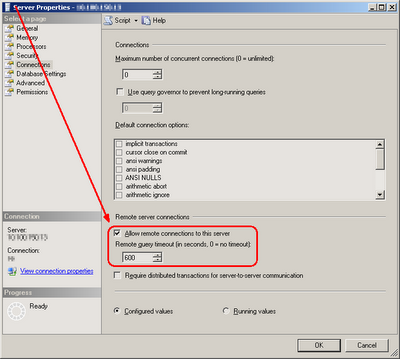
(if you have to use SQL Server 2005 Management Studio, that failed to accomplish such an easy task - not being worse that Enterprise Manager - I'll rant about this more someday)
It is also worth remembering that if you are executing a remote query in a step of a job and this fails because of the timeout, the step will be written to job's history with status 'Successful':
Executed as user: DOMAIN1\sqlagent2005. OLE DB provider "SQLNCLI" for linked server "SRV_2000" returned message "Query timeout expired".
[SQLSTATE 01000] (Message 7412). The step succeeded.
OLE DB provider "SQLNCLI" for linked server "SRV_2000" returned message "Query timeout expired".
check your remote query timeout setting.
To do it execute this query:
sp_configure 'remote query timeout (s)'
or go to:

(if you're lucky enough to still be using SQL Server 2000 Enterprise Manager)
or to:

(if you have to use SQL Server 2005 Management Studio, that failed to accomplish such an easy task - not being worse that Enterprise Manager - I'll rant about this more someday)
It is also worth remembering that if you are executing a remote query in a step of a job and this fails because of the timeout, the step will be written to job's history with status 'Successful':
Executed as user: DOMAIN1\sqlagent2005. OLE DB provider "SQLNCLI" for linked server "SRV_2000" returned message "Query timeout expired".
[SQLSTATE 01000] (Message 7412). The step succeeded.
SQL Server Agent - multiserver administration (MSX/TSX configuration)
The sp_msx_enlist stored procedure adds the current server to the list of target servers available for multiserver operations. Only a SQL Server 2005 server can be enlisted against another SQL Server 2005 server.
That means that you cannot have a configuration with a SQL Server 2005 instance acting as a master server (MSX) and a SQL Server 2000 as a target server (TSX).
If you try to enlist a SQL Server 2000 instance into a SQL Server 2005 master server, you will receive an error like this:
The master server '<SRV_2005>' version 9.00.2047.00 is not compatible with the target server '<SRV_2000>' versions 8.00.2039.
(By the way, there is something wrong with this sentence, isn't it? I mean the word 'versions'.)
That means that you cannot have a configuration with a SQL Server 2005 instance acting as a master server (MSX) and a SQL Server 2000 as a target server (TSX).
If you try to enlist a SQL Server 2000 instance into a SQL Server 2005 master server, you will receive an error like this:
The master server '<SRV_2005>' version 9.00.2047.00 is not compatible with the target server '<SRV_2000>' versions 8.00.2039.
(By the way, there is something wrong with this sentence, isn't it? I mean the word 'versions'.)
Subscribe to:
Posts (Atom)