2006/09/14

Remote query timeout

If you are using linked servers and encounter the following error:

OLE DB provider "SQLNCLI" for linked server "SRV_2000" returned message "Query timeout expired".

check your remote query timeout setting.

To do it execute this query:
  sp_configure 'remote query timeout (s)'

or go to:
SQL Server 2000 Enterprise Manager
(if you're lucky enough to still be using SQL Server 2000 Enterprise Manager)

or to:
SQL Server 2005 Management Studio
(if you have to use SQL Server 2005 Management Studio, that failed to accomplish such an easy task - not being worse that Enterprise Manager - I'll rant about this more someday)

It is also worth remembering that if you are executing a remote query in a step of a job and this fails because of the timeout, the step will be written to job's history with status 'Successful':

Executed as user: DOMAIN1\sqlagent2005. OLE DB provider "SQLNCLI" for linked server "SRV_2000" returned message "Query timeout expired".
[SQLSTATE 01000] (Message 7412). The step succeeded.

SQL Server Agent - multiserver administration (MSX/TSX configuration)

The sp_msx_enlist stored procedure adds the current server to the list of target servers available for multiserver operations. Only a SQL Server 2005 server can be enlisted against another SQL Server 2005 server.

That means that you cannot have a configuration with a SQL Server 2005 instance acting as a master server (MSX) and a SQL Server 2000 as a target server (TSX).

If you try to enlist a SQL Server 2000 instance into a SQL Server 2005 master server, you will receive an error like this:

The master server '<SRV_2005>' version 9.00.2047.00 is not compatible with the target server '<SRV_2000>' versions 8.00.2039.

(By the way, there is something wrong with this sentence, isn't it? I mean the word 'versions'.)

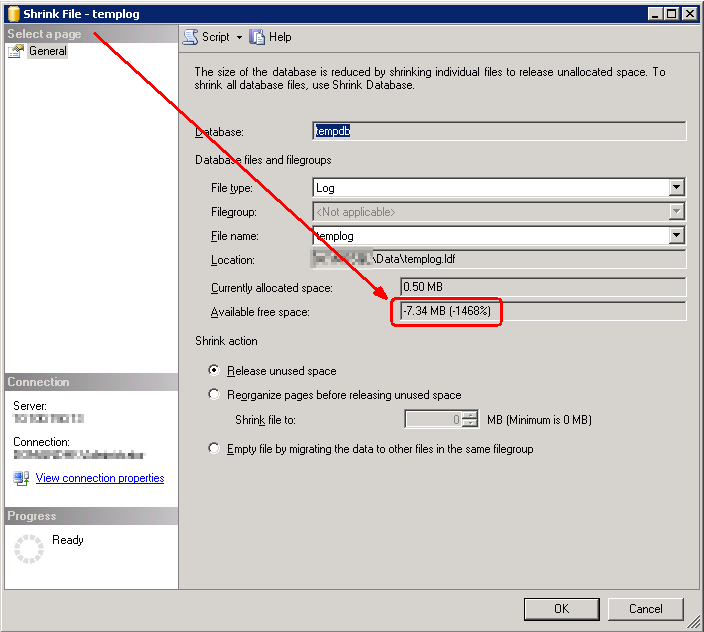
Management Studio showing negative values of free space in tempdb database (screenshots)

Data file
Log file

2006/08/29

'Dedicated administrator connections are not supported. (ObjectExplorer)' error

Dedicated Administrator Connection (DAC) is a new feature of SQL Server 2005; it is a special diagnostic connection for administrators that can be used to connect to a server when standard connections are not possible.

If you are trying to connect to a server using the DAC with SQL Server Management Studio and you keep getting the following error:

Dedicated administrator connections are not supported. (ObjectExplorer)

it means that you are trying to connect Object Explorer using the DAC.

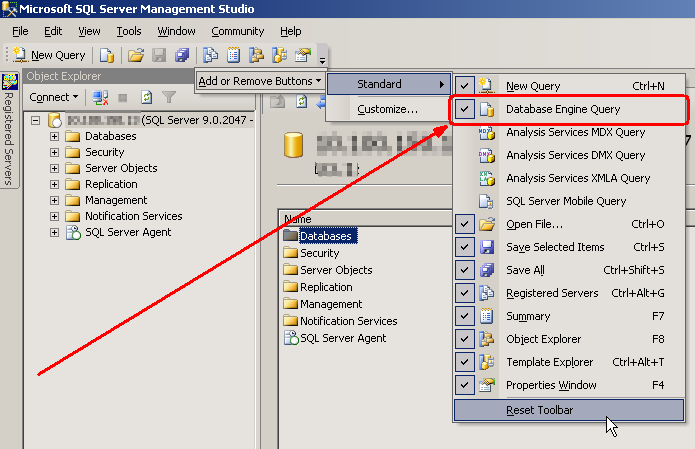
Object Explorer cannot connect using the DAC; only Query Window can. That means that you cannot press the New Query button; you have to use the Database Engine Query button.

2006/08/24

HOWTO: Calculate MD5 checksum in Windows (and other checksums, too)

On Linux that's trivial - there is the md5sum program.

Windows does not come with such a tool, but you can use md5deep package.
md5deep is a cross-platform set of programs to compute MD5, SHA-1, SHA-256 Tiger, or Whirlpool message digests on an arbitrary number of files. The programs run on Windows, Linux, Cygwin, *BSD, OS X, Solaris, and should run on most other platforms. md5deep is similar to the md5sum program found in the GNU Coreutils package (...)

2006/08/12

HOWTO: Perform a scheduled shutdown without installing additional software

The easiest way of performing a scheduled shutdown of a Linux computer, that came to my mind, was executing something like this:

  sleep 3600 && poweroff

However, this couldn't work, since root privileges are necessary to run poweroff command. So you have to use:

  sleep 3600 && sudo poweroff

But this will cause the computer to wait for 1 hour (3600 seconds) and then prompt for the root password. And what we are trying to avoid is sitting in front of the computer at that time.

But there is a very simple solution:
  1. Type sudo visudo to edit the /etc/sudoers file.
  2. Add the following line:
    your_username ALL= NOPASSWD: /sbin/poweroff

Now you can execute sudo poweroff without typing the password.

2006/08/09

ISNULL, implicit conversion and integer data type

SELECT ISNULL(CAST(NULL as int), '+')
0

SELECT ISNULL(CAST(NULL as int), '-')
0

SELECT ISNULL(CAST(NULL as int), '/')
Server: Msg 245, Level 16, State 1, Line 1
Conversion failed when converting the varchar value '/' to data type int.

To explain the above one must to remember that:
  1. ISNULL returns the same type as the check expression (that's the 1st parameter),
  2. varchar and char data types can be implicitly converted to int (if you don't know what it means, try executing SELECT 2 + '2'),
  3. SQL Server treats '+' and '-' characters as a number - 0.
So this is what happens - ISNULL tries to return int data type and it converts the replacement value (that's the 2nd parameter); it succeeds in 2 cases, but fails in the 3rd one, because '/' is not a numeric expression.

2006/08/08

Linux applications - languages

If a Linux application starts and the interface is translated into some language that you don't want to use (or even worse - it is partly translated, as it was in my case, so names in the menus were a mix of English and Polish words), you can go to:

/usr/share/locale/[language_folder]

and delete [application_name].mo file.

Rather a dirty hack, but it works.

You will need root privileges, of course.

2006/07/22

Querying a view in another view, column datatypes & a 'String or binary data would be truncated' error

When you query a view (a child view) inside another view (a parent view), always remember to recreate the latter one when you change a datatype of a column in the former one.

An example:

-- a child view
CREATE VIEW dbo.FOO
AS
  SELECT 'a' AS A
GO

-- a parent view
CREATE VIEW dbo.BAR
AS
  SELECT *
  FROM dbo.FOO
GO

sp_help BAR
-- column A has a datatype of varchar(1)
-- Column_name  Type       Computed   Length
-- ------------ ---------- ---------- ------- [...]
-- A            varchar    no         1

DROP VIEW dbo.FOO
GO

CREATE VIEW dbo.FOO
AS
  SELECT 'aa' AS A
GO

sp_help BAR
-- sp_help still shows that column A has a datatype
-- of varchar(1), although it is now varchar(2) - see
-- the SELECT statement below
-- Column_name  Type       Computed   Length
-- ------------ ---------- ---------- ------- [...]
-- A            varchar    no         1

SELECT *
FROM dbo.BAR
-- A
-- ----
-- aa

If you now try to run the following query:

  SELECT *
  INTO dbo.NEW_TABLE
  FROM dbo.FOO

it will fail with an String or binary data would be truncated error.

2006/07/19

Visual Studio 2003 sets a breakpoint in another file

There is a bug in Visual Studio 2003 that sometimes makes setting a breakpoint in certain files impossible. When you try to set it, the breakpoint is set, but not in the file that you opened - the moment you hit F9, VS jumps to another file and sets the breakpoint there.

I struggled with this problem for quite a long time. I tried using the mouse instead hitting F9, setting the breakpoint on different lines, reopening the file, reloading the project, restarting VS, using another machine. Nothing helped.

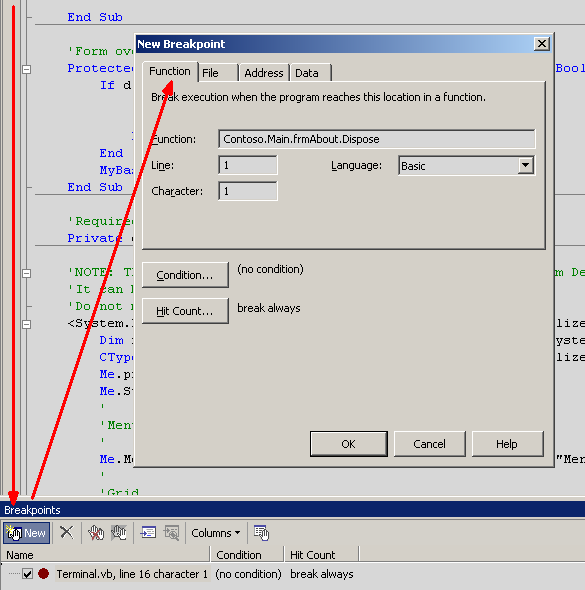
Finally, I discovered that I could open a Breakpoints window (Crtl+Alt+B), press New button and create a new Function Breakpoint - a breakpoint of this type was created successfully.


Note that you can copy the full name of a function from the Class View window.